Human Benchmark Reaction Time vs mechanix.gg: What Each Test Measures
Human Benchmark's reaction test and our League-style benchmarks both give you milliseconds, but they measure different things. What each one times, and which to use when.
 Piotr Vassev··4 min read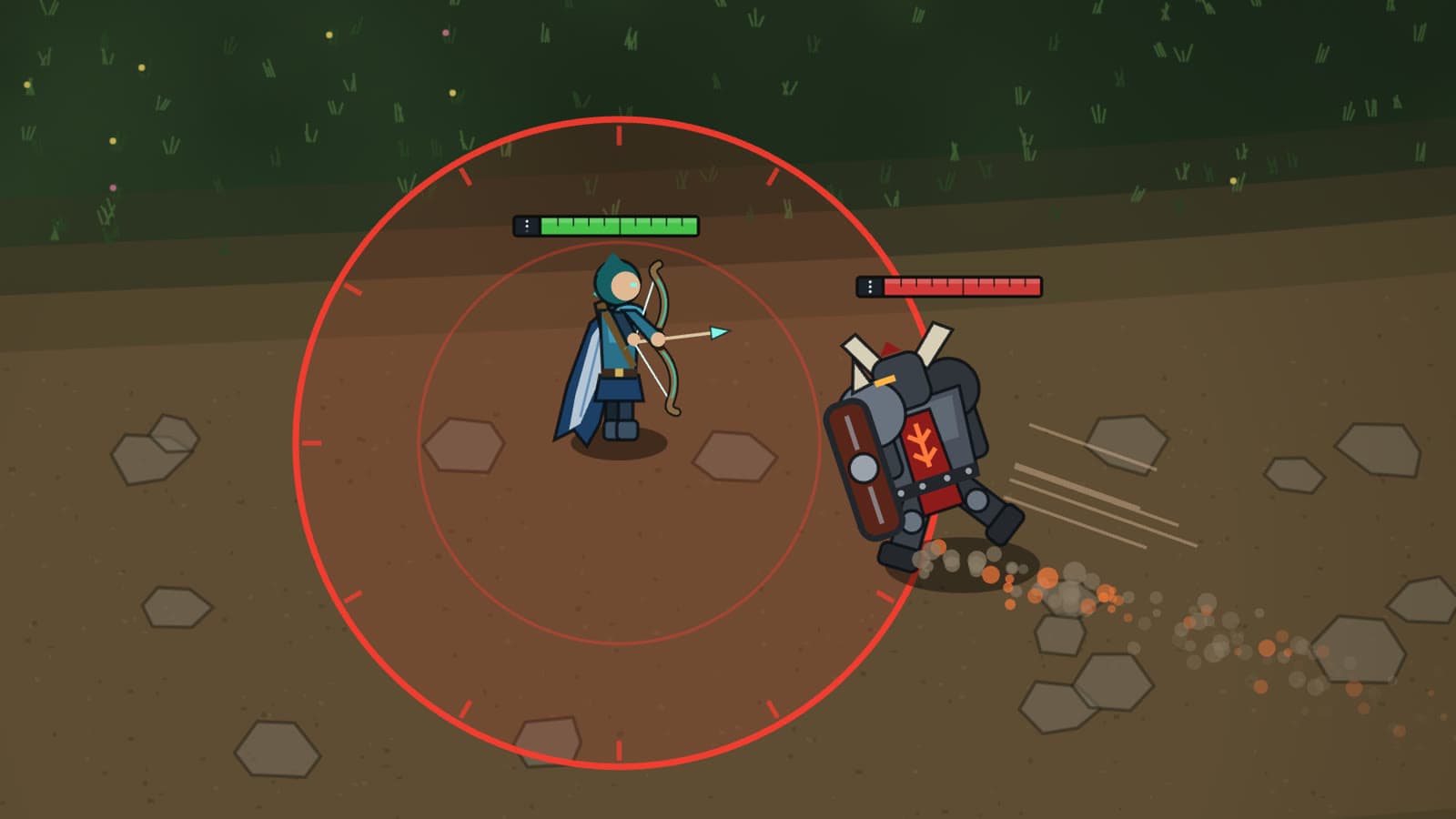
If you've searched "reaction time test", you've probably done Human Benchmark's: wait for the red box to turn green, click, repeat. It's simple, free and so widely played that its numbers have become the common reference point. Our benchmarks also give you milliseconds, but they time a different task, so the two numbers aren't directly comparable. Here's what each one actually measures.
What Human Benchmark measures
The instructions are one line: "When the red box turns green, click as quickly as you can." A round is five clicks, after a random wait of a few seconds each, and your result is their average. Click before the box turns green and you get "Too soon!" and try again.
That's a classic simple reaction time task: one stimulus you're already waiting for, one response you've already chosen. Its strengths are real:
- Simple and fast. A round takes under a minute.
- A huge baseline. Its statistics page reports over 81 million recorded clicks, with a median of 273 ms and an average of 284 ms.
- Upfront about hardware. The site says the test "is affected by the latency of your computer and monitor", and estimates 30 ms as a typical lag for a desktop or laptop.
If you want one number to compare with a friend, or to see whether a new monitor changed anything, it does that job well.
What mechanix.gg measures
Our benchmarks are built around moments from a MOBA. In Flash the Engage, a juggernaut charges at your champion and you have to Flash out of its landing zone before it hits. That changes what's being timed:
- Recognition. The threat is a character on a map, not a full-screen colour change. On Medium the first sign is the enemy's Flash; on Hard the charge comes out of a brush.
- Aim. Your Flash goes toward your cursor, so the result depends on where you're pointing as well as when you press. We report a direction score alongside reaction time.
- A deadline. The charge lands 400–530 ms after it starts on Easy. A fast Flash in the wrong direction still fails.
Human Benchmark makes a related point itself: its reaction scores are faster than its aim trainer's "because you can react instantly without moving the cursor." Our numbers are slower than a colour-change click for the same reason, and that's expected. We explain why choices cost time in What Is a Good Reaction Time for Gamers?
Side by side
| Human Benchmark reaction test | mechanix.gg benchmarks | |
|---|---|---|
| Task | Click when the box turns green | Escape, dodge or cleanse a League-style threat |
| Type of reaction | Simple: one cue, one response | Recognize the threat, then aim or time the response |
| Input | Any click or tap | Ability key plus cursor position, or right-click movement |
| Attempts | 5, averaged | 10 scored, summarized by the median |
| Wait before the cue | Random, a few seconds | Random, 1.5–5 s |
| Pressing too early | Before green: "Too soon!", retry | Before the cue or within 100 ms of it: early, repeated |
| Result | Average time in ms | Median reaction, consistency, success rate and a 0–1000 score |
| Typical use | Quick baseline, setup comparison | Game-specific mechanics and decision speed |
How the timing differs
Both tests run in your browser and both include your hardware's delay. The details differ in ways worth knowing:
- When the clock starts. We start it at the first rendered frame that shows the threat, using the input event's own timestamp to stop it.
- Anticipation. A press under 100 ms after our cue is treated as a guess and the attempt is repeated. No human visual reaction is that fast.
- Frame drops. If a frame takes longer than 50 ms while an attempt is being measured, we can't trust the timing, so that attempt is repeated rather than scored.
- Summary. With ten attempts and a median, one distracted attempt barely moves your result. We also show the spread, because consistency matters in a real fight.
We go through the reasoning behind each of these in What Makes a Good Mechanics Benchmark?
Which one should you use?
Use Human Benchmark if you want a quick simple reaction time on the same scale as millions of other players, or a before-and-after check of a new mouse or monitor.
Use mechanix.gg if you play MOBAs and want to know whether you react fast enough, and in the right direction, to the threats you actually face. A 190 ms click is great, but it doesn't tell you whether you'd Flash out of a Flash-engage combo.
Most players will get something from both. Expect your mechanix.gg reaction time to be slower than your Human Benchmark one. That gap is the cost of recognizing the threat and aiming, and it's the part you can shrink with practice.
Try it · free, in your browserFlash the EngageA juggernaut charges in. Flash out of the zone before it lands.Comparing your scores fairly
- Same device, same day. A different monitor or a laptop trackpad can shift either score by tens of milliseconds.
- Don't compare across tests. 220 ms on a colour change and 280 ms on Flash the Engage can describe the same player.
- Track the trend. Retest the same benchmark on the same setup over a few weeks. That tells you more than any single run.
FAQ
- What is the average reaction time on Human Benchmark?
- Human Benchmark's statistics page reports a median of 273 ms and an average of 284 ms across more than 81 million recorded clicks. That number includes the delay of each player's computer, display and input device, as the site itself points out.
- Why is my mechanix.gg reaction time slower than my Human Benchmark score?
- Because the task is harder. Human Benchmark asks for one click on a colour change you're already waiting for. Our benchmarks show a threat you have to recognize, then ask for the right key with the cursor in the right place, so recognition and aiming are part of the time.
- Is mechanix.gg a Human Benchmark alternative?
- It's a complement more than a replacement. Use Human Benchmark for a quick, widely comparable simple reaction time. Use mechanix.gg when you want to know whether you react in time, in the right direction, to the kind of threat you see in a MOBA.

Piotr Vassev
Software engineer, long-time League player and creator of mechanix.gg. Builds the frame-accurate timing and game simulations behind the benchmarks, and writes about what the numbers actually say.
Connect on LinkedInKeep reading